Table of Contents
A few days ago, Anthropic published the details of a collaboration with
Mozilla
in which Claude Opus 4.6 found 22 vulnerabilities in Firefox over two weeks,
14 of them rated high-severity by Mozilla, accounting for nearly a fifth of all
high-severity Firefox fixes in 2025.
The result was striking enough that we wanted to try the same thing on happyDomain.
The scope we chose: authentication, session management, and the OIDC/OAuth2 flow.
Three areas where mistakes tend to be subtle, where the consequences of getting
them wrong are serious, and where a fresh pair of eyes (even a synthetic one)
can catch things that familiarity makes invisible.
Security audit: 16 findings, 14 fixes
The audit ran in three successive passes over the course of two days. Each pass focused on a distinct layer: the password login flow first, then the session store, then OIDC.
In total, 16 issues came up.
14 were fixed and committed to master on the same day they were found.
Two were acknowledged and intentionally left as-is after looking at the actual
risk (more on that at the end of this section).
The login flow
The most interesting finding here was a timing side-channel.
When a login attempt used an email address that didn’t exist in the database,
the server returned almost immediately: the lookup fails, there’s nothing more
to do.
When the email did exist but the password was wrong, bcrypt comparison ran
first, adding about 100 ms of latency before the error came back.
That difference is measurable.
An attacker sending a list of email addresses and watching response times could
silently identify which ones have accounts, without ever triggering a
failed-login counter.
The fix is to always run a dummy bcrypt.CompareHashAndPassword on the
not-found path; the call is meaningless, but it equalises the timing of both
branches (9e8e1b50).
Two other findings in the same area were less subtle but no less real.
Passwords were hashed with bcrypt.GenerateFromPassword(pwd, 0), which maps to
Go’s DefaultCost of 10.
Cost 12 has become the widely accepted industry baseline; it is roughly
four times harder to brute-force offline than cost 10.
That’s now fixed (46a5d15a), and existing passwords stored at cost 10 are
transparently re-hashed on the user’s next successful login.
The second: no maximum password length was enforced.
bcrypt silently truncates input at 72 bytes, which creates two problems at once.
A user who registers with a 200-character password can later log in with only
the first 72 characters.
And an attacker submitting multi-kilobyte passwords can put the server under
real CPU pressure before truncation kicks in.
A hard limit of 72 characters is now enforced both at registration and at login
(043b81a3).
Brute-force tracking also had a quiet flaw.
All calls to the failure tracker were gated behind a check for a configured
captcha provider.
On deployments without one (which is the default), failed login attempts went
completely untracked and unlimited.
Tracking now runs unconditionally.
Without a captcha provider, exceeding the threshold returns HTTP 429 with a
rate_limited: true flag and the login form disables the submit button (5542c58e).
Speaking of captcha providers: this release also introduces full CAPTCHA
support on both the login and registration flows (00900543).
Four providers are supported out of the box: hCaptcha, reCAPTCHA v2,
Cloudflare Turnstile and lastly Altcha, as a
self-hosted, privacy-friendly alternative (e0d85265).
On the registration endpoint the challenge is always required when a provider
is configured; on the login endpoint it is only triggered after a configurable
number of consecutive failures for the same IP or email address.
Finally, session fixation.
After a successful login, session.Clear() was called before saving, which
zeroes the session’s value map but leaves the session ID untouched.
An attacker who obtains a session ID before authentication (say, by visiting the
login page) can plant it in the victim’s browser, wait for them to log in, and
then replay the same cookie to hijack the authenticated session.
Login now performs a proper two-phase rotation: the old session is deleted from
the database, and the gorilla session’s ID field is reset to "" so the store
generates a fresh random ID on the next save (18df8d59).
The session store
Two high-severity findings here, and one that had been quietly lurking for a long time.
In SessionStore.Save(), when a session needed to be invalidated (negative
MaxAge), storage.DeleteSession() was called but its return value was
discarded entirely.
If the storage layer returned an error, the session record silently stayed in
the database.
A client keeping the session ID as a Bearer token could still authenticate after
the cookie had been cleared on the browser side.
The error is now propagated: if the deletion fails, Save() returns immediately
(502e8710).
The session store also accepted IDs from the Authorization header, either as a
Bearer token or as the Basic Auth username, and forwarded them straight to the
storage layer without any format check.
There was nothing stopping an attacker from sending an arbitrarily crafted
string as a storage key.
A new isValidSessionID() helper now enforces the exact format that
NewSessionID() produces: standard base32 alphabet [A-Z2-7], exactly 103
characters.
Anything that doesn’t match is silently ignored, producing a fresh anonymous
session instead of a storage probe (c889eef9).
The session lifetime deserves its own paragraph.
SESSION_MAX_DURATION was set to 365 days.
The cookie MaxAge was 30 days.
These two numbers were inconsistent with each other and both well outside what
any reasonable security policy would accept.
The renewal logic made things worse: it compared the stored expiry against
now + maxAge and updated it on every single request, so sessions effectively
never expired as long as the user visited at least once a month.
And the load() path read ExpiresOn from storage but never actually checked
whether it was in the past, so Bearer tokens could outlive their expiry
indefinitely.
All three issues are now addressed in a single commit (41fac845):
SESSION_MAX_DURATION is 15 days, a new SESSION_RENEWAL_THRESHOLD of 7 days
controls when renewal actually triggers, and load() now rejects expired
sessions by deleting the record and returning an error.
The OIDC flow
The OIDC findings were the most varied in nature.
The simplest to understand: the next query parameter on the login page was
decoded and passed directly to navigate() without any origin check.
Crafting a link like /login?next=https%3A%2F%2Fevil.com would redirect the
user to an arbitrary external site immediately after authentication, a classic
phishing setup.
The fix is straightforward: the decoded value must start with / and must not
start with // (which browsers treat as a protocol-relative URL).
Anything else falls back to / (bd1a2ab1).
The OIDC authorization code flow was missing both of its standard cryptographic protections.\
No nonce was included in the authorization request, and no nonce claim was
verified in the returned ID token.
The nonce is the anti-replay mechanism for ID tokens: without it, a stolen token
can be submitted to the callback endpoint in a different session and accepted as
valid.
This is code I originally wrote across several projects; the nonce was
actually missing from my first implementations and I had since corrected it in
other codebases and happyDomain was the one I had overlooked.
Now a 32-byte random nonce is generated in RedirectOIDC, stored in the
session, and checked against idToken.Nonce in CompleteOIDC (12d08769).
No PKCE was used either.
Without it, an attacker who intercepts the authorization code (through a
misconfigured redirect URI at the provider, or a network-level intercept) can
exchange it for tokens independently of the session that initiated the flow.
A PKCE S256 verifier is now generated alongside the nonce and verified during
token exchange (f968caaf).
Two smaller findings: when no explicit user identifier was present in the OIDC
claims, a deterministic user ID was derived from the email using sha1.Sum().
SHA-1 has known chosen-prefix collision attacks; it’s been replaced with
SHA-256 (f8fa209c).
And all four error paths in CompleteOIDC were returning raw error strings from
the OIDC library in the HTTP response body, strings that can expose internal
URLs, endpoint addresses, and library version details.
Each path now logs the full detail server-side and returns a generic message to
the client (5f195055).
What wasn’t fixed
Two findings were left open after looking at the actual exposure.
The UserAuth struct has json:"password,omitempty" tags on its password hash
and recovery key fields, but []byte is never considered empty by the JSON
encoder, so both fields would appear in any marshalled output.
The struct is used exclusively for database serialisation and backup tooling and
is never returned through the API, so the practical risk is low.
GetOIDCProvider, GetOAuth2Config, and NewOIDCProvider all access
o.OIDCClients[0] without a bounds check, causing a panic if the slice is empty.
The call site already checks len(o.OIDCClients) > 0 before reaching
NewOIDCProvider, so it’s guarded in practice.
User interface overhaul
A large amount of UI work also landed in 0.6.0.
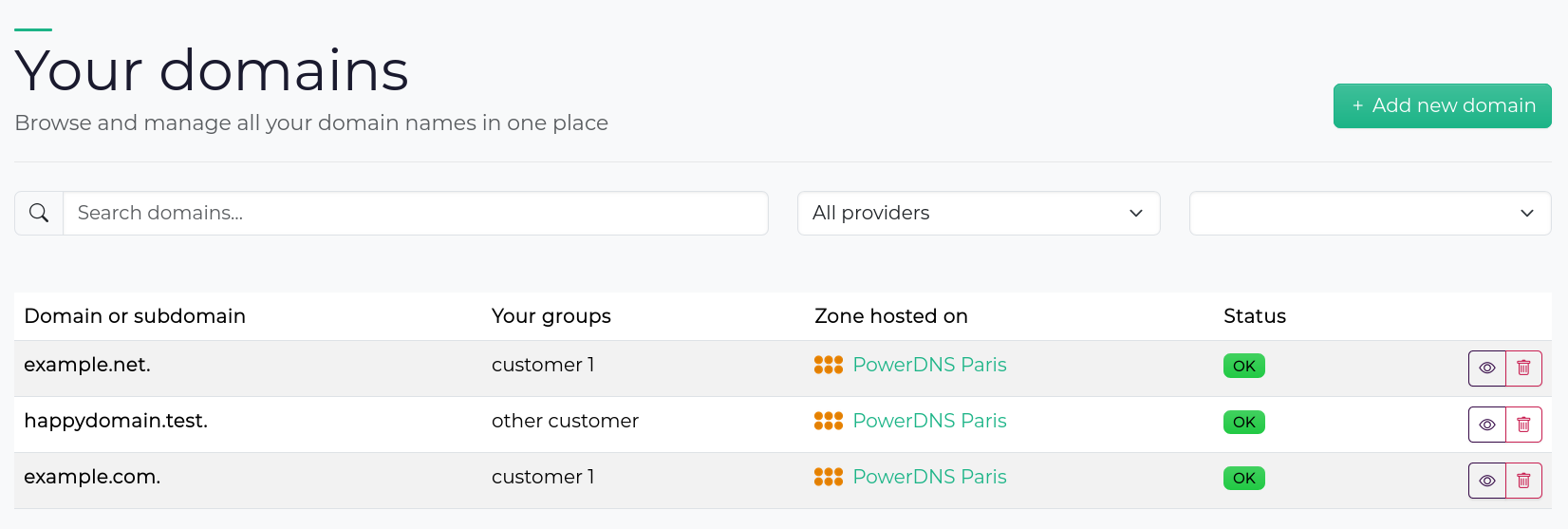
The domain and the providers pages have both been rebuilt as interactive,
filterable tables.
The filter state is synchronised with the URL, so a filtered view is bookmarkable
and shareable.
Creating a new domain or a new provider no longer navigates to a separate page;
a modal opens inline instead.
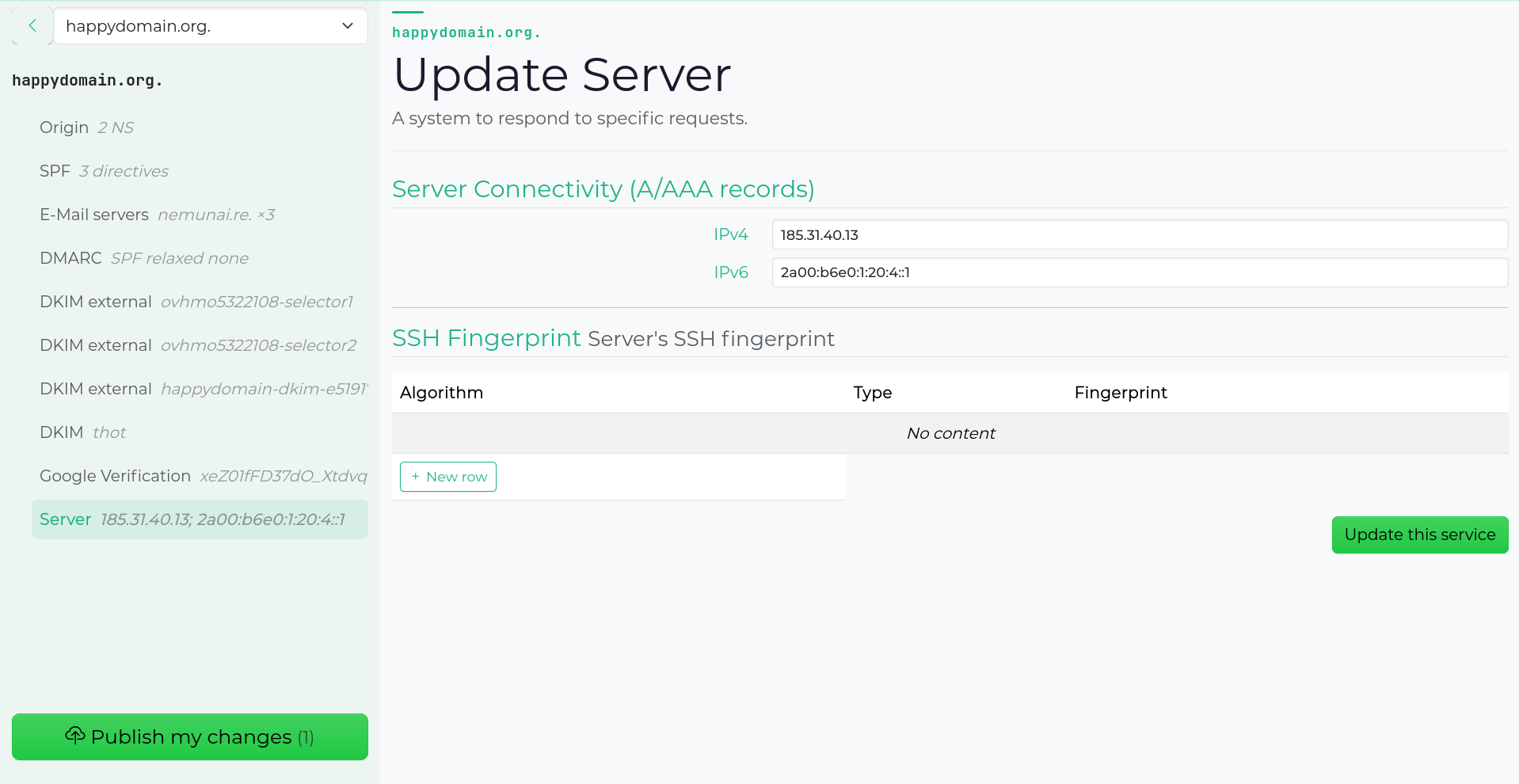
Service editing has been reworked more deeply.
Each service now has its own dedicated page with a sidebar showing the associated
DNS records and available actions.
The sidebar tracks scroll position in the main content pane so the context
follows you as you move through subdomains.
The zone view gained DNS syntax highlighting (via highlight.js),
and zone export moved from a modal to its own page.
On the provider side, the edit page was redesigned with a sidebar surfacing configuration details at a glance.
An admin interface is also included in this release, covering users, domains,
providers, zones, sessions, and backup/restore. It is not well battle tested,
and mostly done with the help of AI, but it’s also not exposed on the same
user interface. To access it, you’ll need to open another port with
-admin-bind. Pay attention that there is no authentication on this
interface/API.
On the provider side, three new DNS registrars are available: DNScale, Gidinet, and Infomaniak. Thanks to the amazing work of the DNScontrol people.
Finally, happyDomain can now be hosted at a sub-path of a domain by setting the
--base-path flag, useful when you want to serve it at example.com/dns/
rather than the root.
What’s coming next
The next feature we’re working on is domain and service health checks: domain expiration, automated validations that surface common misconfigurations directly in the interface.
Most of the work has been done during the previous months, we hope to ship those incredible new features soon!
Would you like to try happyDomain?
You can choose to try it out:
- Online: create your user account on https://happydomain.org/.
- On your server: download the binaries here: https://get.happydomain.org/master/. You'll find them for Linux, both for classic machines and servers (amd64), and for recent Raspberry Pi models such as armv7 or arm64, and older ones like armhf.
-
You can also launch our Docker image:
docker container run -e HAPPYDOMAIN_NO_AUTH=1 -p 8081:8081 happydomain/happydomain
TheNO_AUTHoption bypasses user account creation, which is ideal for testing. Of course, don't use it in everyday life.
Then go to http://localhost:8081/ to start managing your domains!
You can help us go further!
happyDomain is growing, and we need your talents to make it even simpler and more useful.
Users, administrators, newcomers, give your opinion to guide future functionalities by suggesting or voting for future features.
Developers, translators, copywriters, screen designers, testers, join the joyeuxDNS team! You'll find us on our Git repository here.